
You have spent hours on your resume. Your experience is solid. Your qualifications match the role. So why is nobody calling you back?
The answer might not be about what you wrote. It might be about what a machine never got to see. Before your resume reaches a human recruiter, it passes through Applicant Tracking System (ATS) software that scans it for keywords, formatting, and structure. If the ATS cannot parse your resume properly, it gets filtered out before anyone reads it.
Most job seekers do not know this is happening. You could have a genuinely strong resume, but if the ATS chokes on your formatting, the employer never finds out you applied.
Quick answer: You can check your resume’s ATS compatibility using offline tools like Resumy (free, runs locally on Windows, no data upload) or cloud-based checkers like Jobscan and Resume Worded. The best approach: fix formatting first, then test against the actual job description you are applying to.
How ATS screening actually works
ATS software is not smart. That is the core problem. Unlike a recruiter who can read between the lines, recognize transferable skills, or overlook a minor formatting quirk, ATS systems are rigid, literal, and rule-based.
When your resume arrives, the system parses the text and tries to break it into sections: contact information, work experience, education, skills. It extracts keywords and compares them against the job description. It assigns a score based on how many keywords match, whether the structure follows expected patterns, and whether the content is complete. Resumes that score below a threshold get filtered out. The ones that remain get ranked for recruiter review.
The fragility is the real issue. ATS systems struggle with two-column layouts, unusual fonts, tables, and graphics. They have trouble with non-standard file formats. They cannot understand that “led a team of 5 engineers” implies leadership unless the word “leadership” actually appears. If your section headings say “Key Achievements” instead of “Experience,” the system might skip that content entirely.
The result is that qualified candidates get filtered out every day — not because their resumes are bad, but because ATS cannot read them.
The honest truth: Industry estimates suggest 75% or more of applications are automatically rejected before human review. That is not because most candidates are unqualified. It is because resume format and keyword matching fail silently.
What the recruiter sees on their end
Understanding the recruiter’s perspective makes the problem clearer. When a recruiter opens their ATS dashboard — whether it is Workday, Greenhouse, Lever, Taleo, or something else — they do not see your beautifully formatted PDF. They see a parsed, plain-text version of your resume, often displayed in a standardized layout the ATS creates.
This means your custom fonts, your carefully chosen colors, your two-column layout — none of it reaches the recruiter’s eyes in the way you designed it. What they see is whatever the ATS managed to extract. If the parsing went well, the content is intact and organized. If it went badly, they see scrambled text, missing sections, or a garbled mess they will skip in three seconds.
Most recruiters review dozens or hundreds of resumes per open role. They spend an average of six to eight seconds on initial screening. If the ATS extracted your content cleanly, those seconds count. If it did not, you never had a chance.
This is also why keyword matching matters beyond just passing a threshold. Even after a resume clears the ATS filter, recruiters use the same system to search for candidates. A recruiter filling a data engineering role might search their ATS for “Spark” or “Airflow” or “dbt.” If those words are not in your parsed resume — even if you have the experience — you will not appear in their search results.
What ATS checks for
Keyword matching
ATS systems extract keywords from the job description and search your resume for matches. If a job requires “Python programming” and your resume says “experienced in Python,” that is a match. If you say “proficient in coding languages,” the system might miss it entirely.
Weighting matters too. Keywords that appear in the Skills section or in experience headlines tend to carry more weight than those buried in a paragraph. Industry-standard terminology scores better than creative phrasing. Repetition helps to a point, but only when it reads naturally — keyword stuffing flags as suspicious.
There is an important distinction between hard skills and soft skills in ATS context. Hard skills (Python, Salesforce, financial modeling, HIPAA compliance) are matched almost literally. Soft skills (leadership, communication, problem-solving) are matched too, but they carry less weight in most systems because nearly every resume includes them. If a job description emphasizes specific hard skills, those are the keywords that matter most for your score.
Formatting and parsing
The system converts your resume into plain text before analyzing it. Everything visual — fonts, colors, columns, spacing — gets stripped away. If your resume relies on a two-column layout, the text extraction often scrambles content from both columns together. Tables are parsed unpredictably, with dates and job titles sometimes separated from descriptions. Dates, phone numbers, and email addresses need to be in standard formats or they may not be extracted at all.
Headers and footers are another common trap. Some applicants put their name and contact info in the document header. Many ATS systems ignore headers and footers entirely, which means your name and email vanish from the parsed version.
Section structure
ATS expects to find Contact Information, Professional Summary, Work Experience, Education, and Skills. These do not need to be labeled exactly that way, but they need to be close. “Professional Experience” works fine. “My Journey” or “Where I Have Been” probably will not.
The order matters less than most people think. Some guides insist on a specific section order, but most modern ATS systems can identify sections regardless of where they appear. What matters more is that the sections exist and are clearly labeled.
File format
Clean PDF and .docx are the safest choices. Some ATS systems struggle with encoding in certain PDFs — especially those exported from design tools like Canva or InDesign — so .docx is often the most universally compatible. Fancy formats from Google Docs exports or .pages files frequently fail parsing entirely.
One underappreciated detail: PDF/A (the archival PDF format) sometimes parses better than standard PDFs because it embeds fonts and uses a stricter structure. If your PDF editor offers a PDF/A export option, it is worth trying.
Completeness
Many systems score resumes on whether all expected sections are present, whether employment dates have gaps, and whether contact information is complete. A resume missing an Education section may score lower even if the role does not require a degree. Including the section — even with minimal content — is better than omitting it.
The systems behind the curtain
Not all ATS software is the same, and knowing which system a company uses can inform your approach.
Workday is dominant in large enterprises and Fortune 500 companies. It tends to be strict about formatting and relies heavily on structured data fields. If you have ever applied through a portal that asked you to manually re-enter your work history after uploading a resume, that was probably Workday. The manual entry actually matters — Workday often weighs the structured fields more than the uploaded document.
Greenhouse is popular with mid-size tech companies and startups. It tends to be more forgiving with formatting and is better at parsing modern resume styles. If you are applying to tech companies, Greenhouse is a common backend.
Lever is similar to Greenhouse in its tech-company adoption. It combines ATS with CRM functionality, which means recruiters can track candidates across multiple roles. Your resume might be searched months after you originally submitted it.
Taleo (Oracle) is common in government, healthcare, and large traditional companies. It is one of the older systems and tends to be less forgiving with formatting. If you are applying to a government agency or a hospital network, assume Taleo-level strictness.
iCIMS is widespread in retail, hospitality, and mid-market companies. It handles standard formatting reasonably well but struggles with the same graphics and tables that trip up other systems.
You usually cannot know which ATS a company uses before applying. The practical takeaway is to optimize for the strictest common denominator: clean formatting, standard sections, clear keywords. A resume that passes Taleo will pass everything else.
Common mistakes that fail ATS
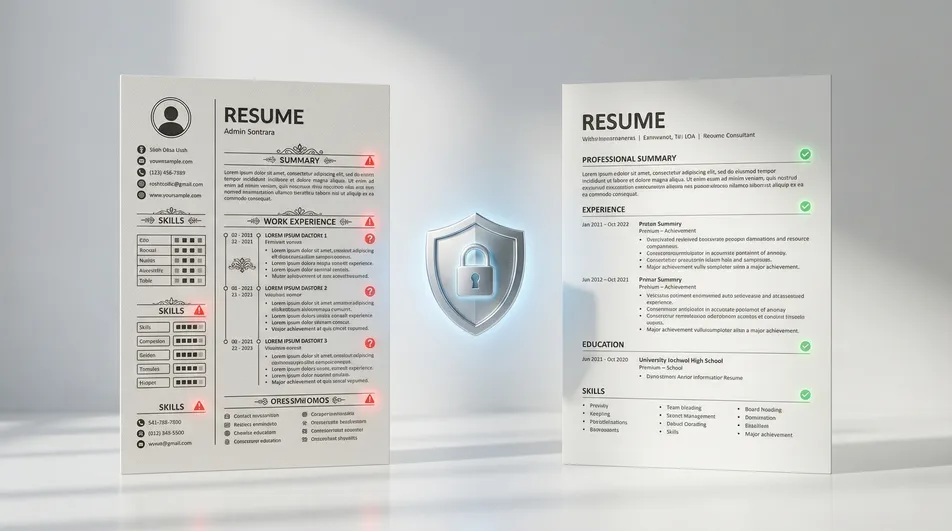
Fancy templates and graphics. Those beautiful resume templates with custom fonts, colored sidebars, icons, and skill-bar graphics look great to humans. To ATS, they are noise. The text extraction produces scrambled content where contact information ends up in the middle and important keywords get buried in corrupted formatting.
Two-column layouts. ATS reads linearly, left to right, top to bottom. A two-column resume gets parsed with both columns interleaved, making your experience unreadable to the algorithm.
Tables. Using a table to organize your experience cleanly backfires because ATS parses tables unpredictably. Content order gets jumbled, and dates or job titles might get separated from the descriptions they belong to.
Wrong terminology. If the job description says “Agile methodology” and your resume says “sprint-based development,” that is close but might not match. If it says “AWS” and you say “cloud platforms,” that is too generic. The safest strategy is to use both — mention “AWS” explicitly and then add context: “cloud platforms (AWS, GCP).” This covers exact-match searches and broader ones.
Unexplained employment gaps. ATS systems flag date gaps as red flags. If your timeline shows six months unaccounted for, the system may downrank your resume. If you took time off intentionally — for caregiving, education, health, travel — a brief note closes the gap without requiring detail you do not want to share.
Contact info in the header. As mentioned earlier, many ATS systems skip document headers. Put your name, email, phone, and LinkedIn URL in the main body of the document, not in the header or footer.
📊 Offline vs. cloud-based ATS checkers
| Feature | Offline (e.g. Resumy) | Cloud-Based (Jobscan, Resume Worded, etc.) |
|---|---|---|
| Privacy | Resume stays on your PC | Data uploaded to their servers |
| Cost | Free | Free tier + paid plans ($10-30/month) |
| Works offline | Yes | No |
| Resume building | Full editor included | Varies by platform |
| Best for | Privacy-first, quick local checks | Detailed competitive analysis |
How to check and fix your resume
Step 1: Get the job description
Copy the full text of the job posting you are applying to. You need this because ATS scoring is relative — it compares your resume against the specific requirements of that role. A resume that scores 85% for one position might score 40% for another, even if the roles seem similar.
Step 2: Fix formatting before testing
Before running any checker, handle the basics. Use a single-column layout. Remove tables, graphics, and icons. Stick with standard fonts like Arial, Calibri, or Times New Roman. Use conventional section headings. Put contact information in the document body, not the header. Save as .docx or a clean PDF.
This step alone fixes the majority of ATS parsing failures. It is not glamorous work, but it is the highest-impact change you can make.
Step 3: Run an ATS check
Use an offline tool or a cloud-based checker to compare your resume against the job description. What you are looking for is the overall compatibility score, which keywords are missing, and whether any formatting issues are flagged.
For offline checking, Resumy runs the analysis locally on your PC without uploading anything. For cloud-based options, Jobscan is the most popular for keyword matching, Resume Worded offers broader writing feedback, and Rezi combines ATS checking with an AI resume builder.
Step 4: Add missing keywords naturally
Look at which keywords are flagged as missing and think about where they belong. Technical skills go in the Skills section. If a missing keyword describes something you actually did in a past role, work it into that experience bullet. If the job emphasizes “cross-functional collaboration” and your resume does not mention it, adding a line like “Collaborated with marketing and engineering teams to launch 3 product features” is natural and honest.
What does not work: pasting the keyword list into a white-text block at the bottom of your resume, or repeating the same term five times in your summary. Some ATS systems catch hidden text. Recruiters who read past the ATS definitely will.
A useful mental model: read the job description and highlight every specific skill, technology, methodology, and credential mentioned. Then check your resume for each one. If you have the skill but did not mention it, add it. If you do not have the skill, skip it — do not claim expertise you lack.
Step 5: Tailor for each application
This is the single most important insight: one resume does not fit all jobs. Different positions emphasize different skills and terminology even within the same field. A “Product Manager” role at a fintech startup and a “Product Manager” role at a healthcare company will have overlapping but meaningfully different keyword profiles.
Adjust your Skills section for each application. Reorder experience bullets so the most relevant achievements appear first. Update your professional summary to echo the language of the specific posting. Save each version with a clear filename so you can track which resume went where.
This is not dishonest. It is emphasizing different true things about your experience for different contexts. Everyone does this when they talk about their background in conversation — you highlight different aspects depending on who you are talking to.
Step 6: Re-check
Run the ATS check again after making changes. A score above 70% is generally strong enough. Do not chase 100% — that usually results in a resume that reads like a keyword list instead of a professional document. The goal is to clear the automated filter, not to win a high score. Once you pass, it is your actual content and experience that matter.
When ATS matters less
Not every application goes through automated screening.
If someone refers you internally, your resume often goes directly to the hiring manager. Small companies with under 50 employees frequently review every application manually — they simply do not have enough volume to justify ATS software. Creative roles tend to weight portfolios more heavily than resume keywords, though the initial screening might still be automated. Academic positions often use manual review, but universities are increasingly adopting ATS, especially for administrative and non-faculty roles.
Executive and C-level searches are typically handled by dedicated recruiters or executive search firms who read every resume personally. At that level, network and reputation matter more than keyword density.
In these situations, spending time on visual design and personality might serve you better than strict ATS optimization. But when in doubt, start with ATS-safe formatting. A clean, well-structured resume is readable by both machines and humans. A beautifully designed resume that ATS cannot parse only works if a human sees it first.
The cover letter question
Most ATS systems do not parse cover letters with the same rigor they apply to resumes. Some ignore them entirely. Some store them but do not factor them into scoring.
This does not mean cover letters are pointless. Recruiters who make it past the ATS filter often do read cover letters, and a strong one can make the difference when two candidates have similar qualifications. The practical advice: always include a cover letter because it costs you nothing and helps with the human review stage. But do not rely on it to carry keywords that your resume is missing — the ATS filter happens first.
If a job application portal has a separate field or upload slot for the cover letter, use it. If it only accepts one file, consider whether combining your cover letter and resume into a single document might confuse the parser. In most cases, uploading them separately is cleaner.
Troubleshooting
Low score despite relevant experience. The most common cause is that your resume describes experience too generally. “Responsible for marketing” scores worse than “Managed paid social campaigns across Meta and Google Ads, generating 2.4M impressions quarterly.” Be specific. Use the same language the job posting uses. If they say “project management,” do not assume “managed projects” is close enough — include the exact phrase.
Resume will not import into checkers. This usually means the PDF is a scanned image rather than searchable text. Try selecting text in the PDF with your cursor. If you cannot highlight individual words, the document is image-based and needs to be recreated as a text document. Export as .docx instead, or rebuild without tables and complex layouts.
Keywords flagged as missing even though they are present. They are probably trapped inside a table, graphic, or non-standard section that the parser cannot reach. Move them into plain text within standard sections. Also check for spelling differences — “JavaScript” vs “Javascript” vs “Java Script” can matter in literal matching systems.
Resume parses correctly in one tool but not another. Different ATS systems and different checkers parse text differently. The safest strategy is to prioritize clean, simple formatting that works everywhere rather than optimizing for a single system. If your resume passes two or three different checkers cleanly, it will handle most real-world ATS systems.
FAQ
Does ATS really reject 75% of resumes?
Industry estimates range from 75% to over 90%, depending on the source and company size. The exact number matters less than the implication: a significant majority of applications never reach human eyes. Proper formatting and keyword alignment meaningfully improve your odds.
Can I use the same resume for every job?
You can, but you should not. Tailoring your resume for each position — adjusting the Skills section, reordering experience bullets, matching terminology — is the single highest-impact change most job seekers can make. It takes 15-20 minutes per application and dramatically improves match rates.
Is keyword stuffing bad?
Yes. Including relevant keywords from the job description is important, but repeating them unnaturally hurts readability and can flag your resume as manipulative to both ATS and recruiters. Add keywords where they fit naturally within your actual experience.
What ATS score is good enough?
Most systems consider 60-70% a passing threshold. Above 70% is strong. Chasing 100% is not worth the effort and usually results in an awkwardly written resume that reads well to machines but poorly to humans.
Should I lie about skills to match keywords?
No. You will get caught in interviews or on the job. If you have partial experience with something, say so honestly: “Basic experience with Tableau” is better than “Expert in Tableau.” Focus on the skills you genuinely have and present them clearly.
Can I use Canva or Google Docs to make my resume?
Not recommended for ATS. Both platforms can produce PDFs that ATS software struggles to parse. The visual output looks great, but the underlying text structure is often messy. Use a traditional word processor or a dedicated resume builder that exports clean, ATS-compatible files.
What about photos on resumes?
In the US, photos are generally discouraged and can introduce bias. In many European and Asian countries, photos are standard. From an ATS perspective, photos are ignored during parsing — the system only cares about text. But an embedded photo can occasionally interfere with text extraction depending on how it is positioned in the document. If you include one, keep it small and outside the main text flow.
How often should I check my resume?
Every time you apply to a meaningfully different role. If the job description has different keywords than your last application, your resume should reflect that. Keeping a “master resume” with all your experience and then tailoring a version for each application is the most efficient workflow.
Sources
- SHRM: Talent Acquisition Technology and Practices
- Jobscan: ATS Parsing Research and White Papers
- Harvard Business School / Accenture: Hidden Workers: Untapped Talent (2021)
- Greenhouse Blog: How Applicant Tracking Systems Work
- Lever: The Modern Recruiter’s Guide to ATS
Final takeaway
ATS filtering is a fixable problem. Your resume is not failing because you lack qualifications. It is failing because the software that reads it cannot handle your formatting, your terminology, or your structure.
Start by fixing the basics: single column, standard fonts, conventional section headings, contact info in the document body, clean file format. Then test against the actual job description using a tool like Resumy or a cloud-based checker. Tailor for each application. Recheck.
You are not trying to trick the system. You are translating your qualifications into a format the system can actually read. Once your resume passes ATS, it reaches human eyes, and that is where your experience starts to matter.
